How it fits together
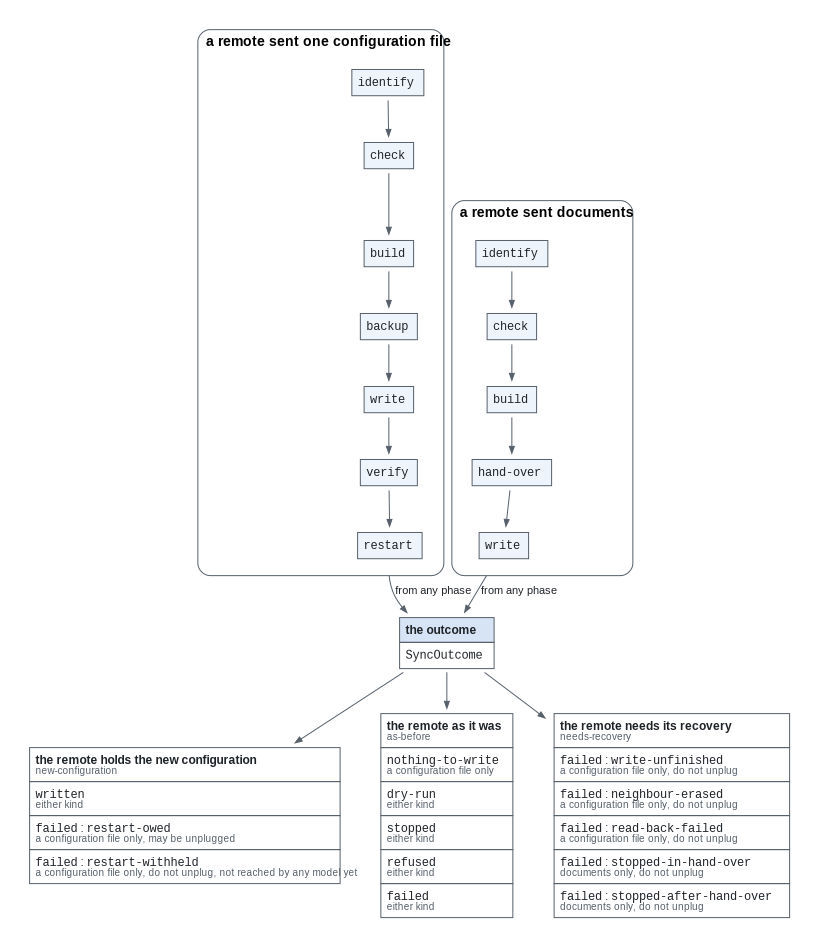
The SDK is five packages an application installs side by side. This page is the picture before the detail: which
package does what, what an application does with the one document it holds per remote, what that document holds, and
what a sync of it to a remote does. In the code a document is a Recipe, and recipe is the toolkit that makes and
changes one. Each drawing is generated from the libraries' own source and checked against it by a test that fails
when the two disagree, so it shows what the code does. The guide then takes the same steps as small
programs that run.
The packages
An application imports each package by its name: a dashed line in the drawing is such an import, and a solid line is
one package depending on another. Most of what an application does is in the config package: the document, the
toolkit that changes it, the check and the build. The remote package reads a remote's configuration and, on its
write subpath, syncs a document to a remote. The USB package finds a remote on the cable and talks to it: an
application opens a remote through it to read, and a sync writes through it, behind checks a caller cannot skip. It
reaches the cable through node-hid, a native module, so it and the remote package run in Node, while the other
three also load in a browser or an Electron renderer. On Node the config package has an entry of its own,
@freeharmony-sdk/config/node, which carries everything its main entry has and adds what reads the disk and the
fonts a build draws the remote's screens with.
The life of a document
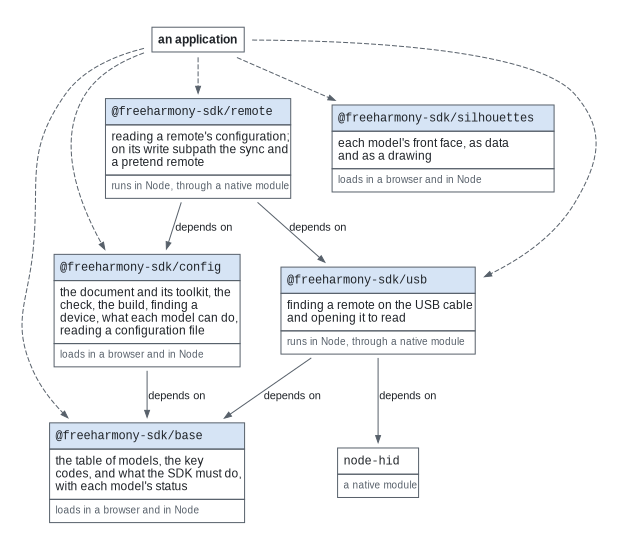
A document starts from a model, named as Logitech names it, or from a document saved earlier as JSON. From then on
an application keeps one document per remote and replaces it with the new one each change returns, so an undo is
keeping the old one. It asks the check for problems to show beside the fields a person edits, builds the document
where it wants what the remote is sent without sending it, and syncs it to send it: a sync runs the check and the
build itself before it writes. Whether a build or a sync is there for the model at all it asks before offering
either: capabilitiesOf answers for the build with builds, and syncIsBuilt for a sync. Each box after a step is
the type that step's function returns.
The shape of a document
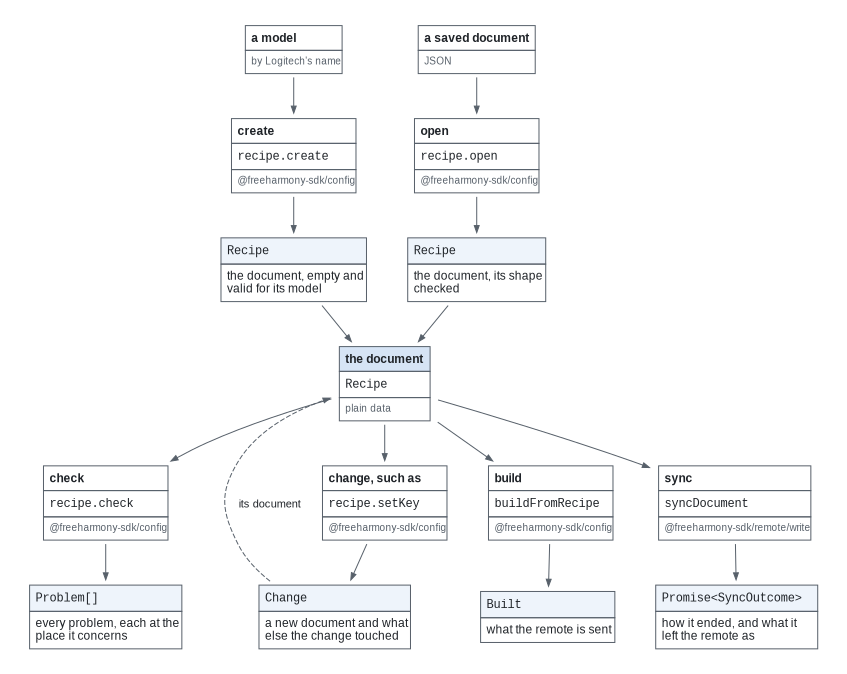
A document is plain data, the same shape for every model: the model it is for, its devices, its activities and the
remote's own settings. A device and an activity each hold the keys a person chose otherwise in their own map, and
the list their screen shows; an activity names the devices it uses, with the input each is switched to and the role
each plays. A field marked ? may be left out, and what leaving it out means is in its comment. A shaded row holds
another type of the drawing, and a line leads to it. The documents shows each type with its comments,
and Recipe in the API reference links every type the drawing leaves out.
A sync
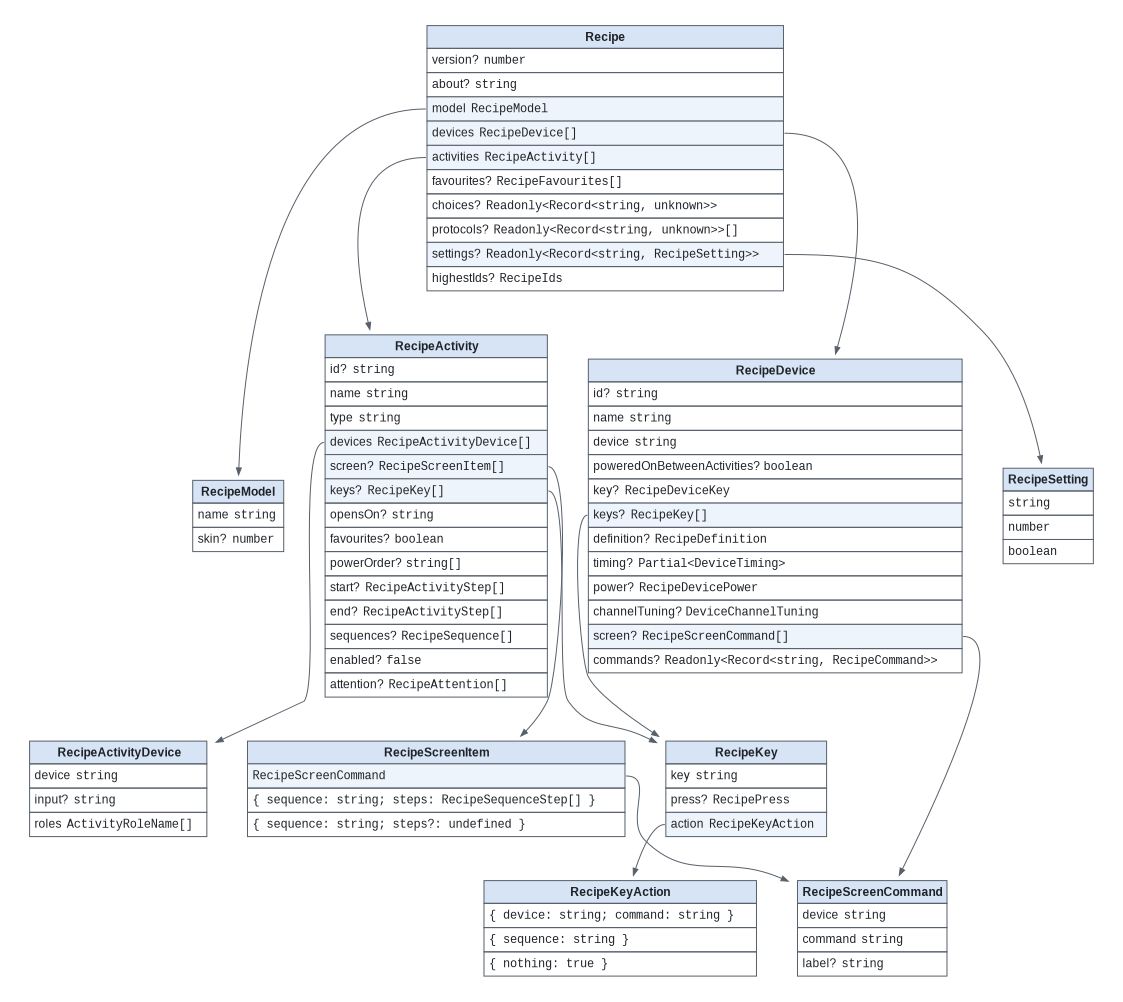
A sync goes through its phases in order and reports each as an event, so a screen can show where it is. Which phases there are depends on what the model is sent. A Harmony One is sent one configuration file, which the sync backs up before writing, reads back after writing and makes the remote take up by restarting it. A Harmony Touch is sent documents: it first hands up the changes made on its own screens, then asks for the documents and commits them by itself. From whichever phase it reached, a sync ends in one outcome. The outcome says what it left the remote as: as it was, holding the new configuration, or needing to be put right; and a failure that leaves something owed names a state, which says whether the remote may be unplugged and what puts it right. One of those endings, a restart withheld by a check, is not reached by any model yet. A sync takes a remote on the cable or a pretend one, which answers as a remote on the cable does, and it writes only the remotes on the libraries' own list. That list holds no user's remote yet, so writing a user's own remote is not built yet.